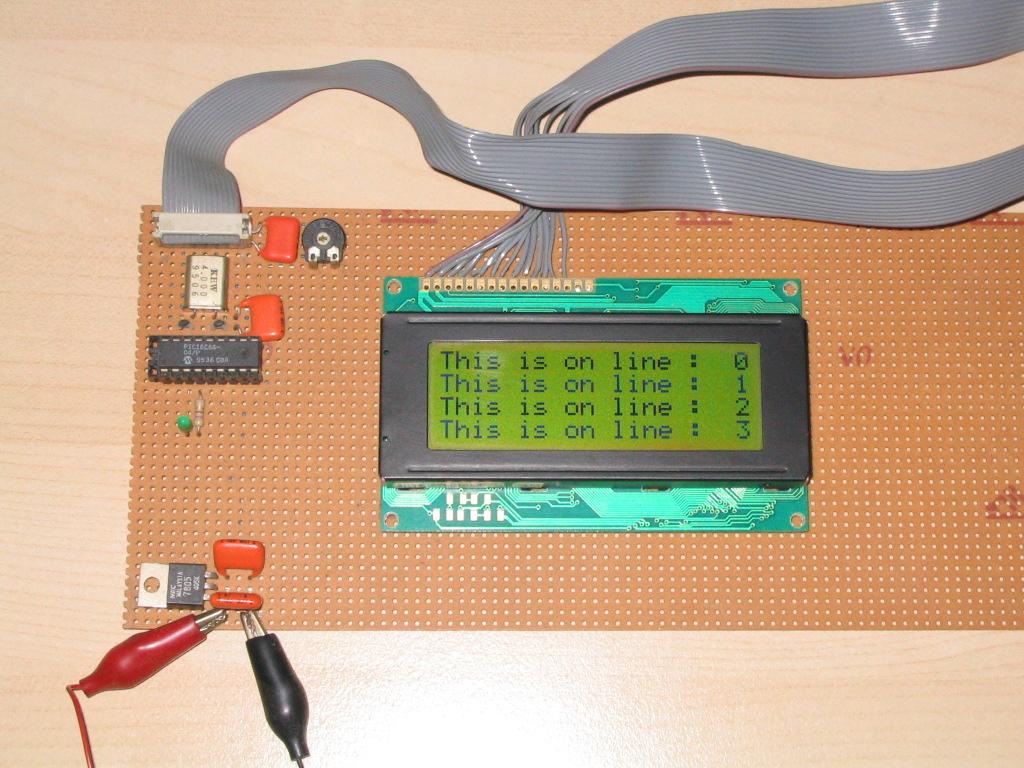
- Tells MPASM which ports and registers (files) to use.
LCD_DATA        EQU	PORTB           ; LCD data lines interface
LCD_DATA_TRIS   EQU	TRISB
LCD_CTRL        EQU	PORTA           ; LCD control lines interface

LCD_TEMP        EQU	0x020           ; LCD subroutines internal use

DELAY           EQU	0x023           ; Used in DELAYxxx routines
X_DELAY         EQU	0x024           ; Used in X_DELAYxxx routines
- Literal declarations (Equates) used in the code.
; PORTA control bits
LCD_E           EQU	2               ; LCD Enable control line
LCD_RW          EQU	1               ; LCD Read/Write control line
LCD_RS          EQU	0               ; LCD Register-Select control line
- LCD initialisiation code to be executed after power-up (i.e.: before any other subroutines are used).
- Should be modified to your needs (i.e. display type, cursor on/off, etc.)
LCDINIT
                                    ; Busy-flag is not yet valid
    CLRF        LCD_CTRL            ; ALL PORT output should output Low.
                                    ; power-up delay
    MOVLW       0x01E
    CALL        X_DELAY500          ; 30 * 0.5mS = 15mS
                                    ; Busy Flag should be valid from here
    MOVLW       0x038               ; 8-bit-interface, 2-lines
    CALL        LCDPUTCMD
    MOVLW       0x000               ; disp.off, curs.off, no-blink
    CALL        LCDDMODE
    CALL        LCDCLEAR
    MOVLW       0x004               ; disp.on, curs.off
    CALL        LCDDMODE
    MOVLW       0x002               ; auto-inc (shift-cursor)
    CALL        LCDEMODE
    RETURN
- Tests if the LCD is busy. Returns when LCD busy-flag is inactive.
LCDBUSY
    BSF         STATUS,RP0          ; Select Register page 1
    MOVLW       0x0FF               ; Set PORTB for input
    MOVWF       LCD_DATA_TRIS
    BCF         STATUS, RP0         ; Select Register page 0
    BCF         LCD_CTRL, LCD_RS    ; Set LCD for command mode
    BSF         LCD_CTRL, LCD_RW    ; Setup to read busy flag
    BSF         LCD_CTRL, LCD_E     ; LCD E-line High
    MOVF        LCD_DATA, W         ; Read busy flag + DDram address
    BCF         LCD_CTRL, LCD_E     ; LCD E-line Low
    ANDLW       0x80                ; Check Busy flag, High = Busy
    BTFSS       STATUS, Z
    GOTO        LCDBUSY
LCDNOTBUSY
    BCF         LCD_CTRL, LCD_RW
    BSF         STATUS, RP0         ; Select Register page 1
    MOVLW       0x000
    MOVWF       LCD_DATA_TRIS       ; Set PORTB for output
    BCF         STATUS, RP0         ; Select Register page 0
    RETURN
- Clears display and returns cursor to home position (upper-left corner).
LCDCLEAR
    MOVLW       0x001
    CALL        LCDPUTCMD
    RETURN
- Returns cursor to home position.
- Returns display to original position (when shifted).
LCDHOME
    MOVLW       0x002
    CALL        LCDPUTCMD
    RETURN
- Sets entry mode of the LCD
- Required entry mode must be set in W
  b0    : 0 = no display shift, 1 = display shift
  b1    : 0 = auto-decrement, 1 = auto-increment
  b2-b7 : don't care
LCDEMODE
    ANDLW       0x003               ; Strip upper bits
    IORLW       0x004               ; Function set
    CALL        LCDPUTCMD
    RETURN
- Sets display control
- Required entry mode must be set in W
  b0    : 0 = cursor blink off, 1 = cursor blink on (if b1 = 1)
  b1    : 0 = cursor off,  1 = cursor on
  b2    : 0 = display off, 1 = display on (display data remains in DD-RAM)
  b3-b7 : don't care
LCDDMODE
    ANDLW       0x007               ; Strip upper bits
    IORLW       0x008               ; Function set
    CALL        LCDPUTCMD
    RETURN
- Sets the Character-Generator-RAM address. CGRAM data is read/written after this setting.
- Required CGRAM address must be set in W
   b0-5	: required CGRAM address
   b6-7	: don't care
LCDSCGA
    ANDLW       0x03F               ; Strip upper bits
    IORLW       0x040               ; Function set
    CALL        LCDPUTCMD
    RETURN
- Sets the Display-Data-RAM address. DDRAM data is read/written after this setting.
- Required entry mode must be set in W
   b0-6	: required DDRAM address
   b7	: don't care
LCDSDDA
    IORLW       0x080               ; Function set
    CALL        LCDPUTCMD
    RETURN
- Returns address counter contents, used for both DDRAM and CGRAM.
- RAM address is returned in W
LCDGADDR
    BSF         STATUS,RP0          ; Select Register page 1
    MOVLW       0x0FF               ; Set PORTB for input
    MOVWF       LCD_DATA_TRIS
    BCF         STATUS, RP0         ; Select Register page 0
    BCF         LCD_CTRL, LCD_RS    ; Set LCD for command mode
    BSF         LCD_CTRL, LCD_RW    ; Setup to read busy flag
    BSF         LCD_CTRL, LCD_E     ; LCD E-line High
    MOVF        LCD_DATA, W         ; Read busy flag + RAM address
    BCF         LCD_CTRL, LCD_E     ; LCD E-line Low
    ANDLW       0x07F               ; Strip upper bit
    BCF         LCD_CTRL, LCD_RW
    BSF         STATUS, RP0         ; Select Register page 1
    MOVLW       0x000
    MOVWF       LCD_DATA_TRIS       ; Set PORTB for output
    BCF         STATUS, RP0         ; Select Register page 0
    RETURN
- Sends character to LCD
- Required character must be in W
LCDPUTCHAR
    MOVWF       LCD_TEMP            ; Character to send is in W
    CALL        LCDBUSY             ; Wait for LCD to be ready
    BCF         LCD_CTRL, LCD_RW    ; Set LCD in read mode
    BSF         LCD_CTRL, LCD_RS    ; Set LCD in data mode
    BSF         LCD_CTRL, LCD_E     ; LCD E-line High
    MOVF        LCD_TEMP, W
    MOVWF       LCD_DATA            ; Send data to LCD
    BCF         LCD_CTRL, LCD_E     ; LCD E-line Low
    RETURN
- Sends command to LCD
- Required command must be in W
LCDPUTCMD
    MOVWF       LCD_TEMP            ; Command to send is in W
    CALL        LCDBUSY             ; Wait for LCD to be ready
    BCF         LCD_CTRL, LCD_RW    ; Set LCD in read mode
    BCF         LCD_CTRL, LCD_RS    ; Set LCD in command mode
    BSF         LCD_CTRL, LCD_E     ; LCD E-line High
    MOVF        LCD_TEMP, W
    MOVWF       LCD_DATA            ; Send data to LCD
    BCF         LCD_CTRL, LCD_E     ; LCD E-line Low
    RETURN
- Used in LCDINIT subroutine
- Required delay factor must be in W
  (Could be coded more efficient, but this approach gives more flexibility)
;***********************************  a 500uS delay @ 4MHz X-tal
DELAY500
    MOVLW       D'165'              ; +1        1 cycle
    MOVWF       DELAY               ; +2        1 cycle
DELAY500_LOOP
    DECFSZ      DELAY, F            ; step1     1 cycle
    GOTO        DELAY500_LOOP       ; step2     2 cycles
DELAY500_END
    RETURN                          ; +3        2 cycles

;***********************************  a delay of 'W' * 500mS
X_DELAY500
    MOVWF       X_DELAY             ; +1        1 cycle
X_DELAY500_LOOP
    CALL        DELAY500            ; step1     wait 500uSec
    DECFSZ      X_DELAY, F          ; step2     1 cycle
    GOTO        X_DELAY500_LOOP     ; step3     2 cycles
X_DELAY500_END
    RETURN                          ; +2        2 cycles
After several requests a quick explanation on how to implement
user-defined characters:

First you'll need to make a pixel definition for the characters
you want to use.  This is the pixel definition for an underlined
'0' (char code 0x30) based on a 5x7 dots character definition:

       |   bits    | byte
  row  | 76543210  | value
  ------------------------
  000  |     xxx   | 0x0E
  001  |    x   x  | 0x11
  010  |    x  xx  | 0x13
  011  |    x x x  | 0x15
  100  |    xx  x  | 0x19
  101  |    x   x  | 0x11
  110  |     xxx   | 0x0E
  111  |    xxxxx  | 0x1F


The byte values need to be loaded into CGRAM address 00cccrrr
(binary), where:
-  ccc = user-defined character number (0...7)
-  rrr = row number of the user defined character (0...7)

Once that's done you can write character codes 0...7 to the
desired LCD character position, just like you do with
'normal' characters.

User-defined character definitions may be changed 'on-the-fly'.

While defining a 5x7 dots character:
- Character code bits (DDRAM) 2..0 correspond to CGRAM address bits 5..3
  (i.e. 8 possible user defined characters).
While defining a 5x10 dots character:
- Character code bits (DDRAM) 2..1 correspond to CGRAM address bits 5..4
  (i.e. 4 possible user defined characters).

It's best to switch off the cursor while writing to CGRAM.

See also 2.6. Related pages.
(More detailed code may be published some day)
    ----------------------
    |This is on line :  0|
    |This is on line :  1|
    |This is on line :  2|
    |This is on line :  3|
    ----------------------
Shows the following screen on a 2*40 LCD:
    -----------------------------------------
    |This is on line :  0This is on line :  2|
    |This is on line :  1This is on line :  3|
    ------------------------------------------
Shows the following screen on a 2*20 LCD:
    ----------------------
    |This is on line :  0|
    |This is on line :  1|
    ----------------------


UNIQUE_ID=ZiIZ-NAidDpoCZtqzmypSgAAAAY
PERL5LIB=/usr/share/awstats/lib:/usr/share/awstats/plugins
HTTPS=on
SSL_TLS_SNI=www.ekenrooi.net
HTTP_ACCEPT=*/*
HTTP_USER_AGENT=Mozilla/5.0 AppleWebKit/537.36 (KHTML, like Gecko; compatible; ClaudeBot/1.0; +claudebot@anthropic.com)
HTTP_HOST=www.ekenrooi.net
PATH=/usr/local/sbin:/usr/local/bin:/usr/sbin:/usr/bin
SERVER_SIGNATURE=
SERVER_SOFTWARE=Apache/2.4.6 (CentOS) OpenSSL/1.0.2k-fips mod_fcgid/2.3.9 PHP/5.5.35 mod_python/3.5.0- Python/2.7.5
SERVER_NAME=www.ekenrooi.net
SERVER_ADDR=46.235.40.106
SERVER_PORT=443
REMOTE_ADDR=18.118.2.15
DOCUMENT_ROOT=/var/www/clients/client40440/web75140/web
REQUEST_SCHEME=https
CONTEXT_PREFIX=
CONTEXT_DOCUMENT_ROOT=/var/www/clients/client40440/web75140/web
SERVER_ADMIN=webmaster@ekenrooi.net
SCRIPT_FILENAME=/var/www/clients/client40440/web75140/web/lcd/lcd2.shtml
REMOTE_PORT=22062
GATEWAY_INTERFACE=CGI/1.1
SERVER_PROTOCOL=HTTP/1.1
REQUEST_METHOD=GET
QUERY_STRING=
REQUEST_URI=/lcd/lcd2.shtml?
SCRIPT_NAME=/lcd/lcd2.shtml
DATE_LOCAL=2024-04-19
DATE_GMT=2024-04-19
LAST_MODIFIED=2012-10-03
DOCUMENT_URI=/lcd/lcd2.shtml
USER_NAME=web75140
DOCUMENT_NAME=lcd2.shtml
QUERY_STRING_UNESCAPED=
DocType=xhtml_11
mode=test
Query=?
tablebordervalue=1
Author=Peter Ouwehand
E-Mail=hd44780@ekenrooi.net
Subject=How%20to%20control%20a%20HD44780-based%20Character-LCD
SiteName=How to control a HD44780-based Character-LCD
SiteSubTitle=The Industry Standard Character LCD